
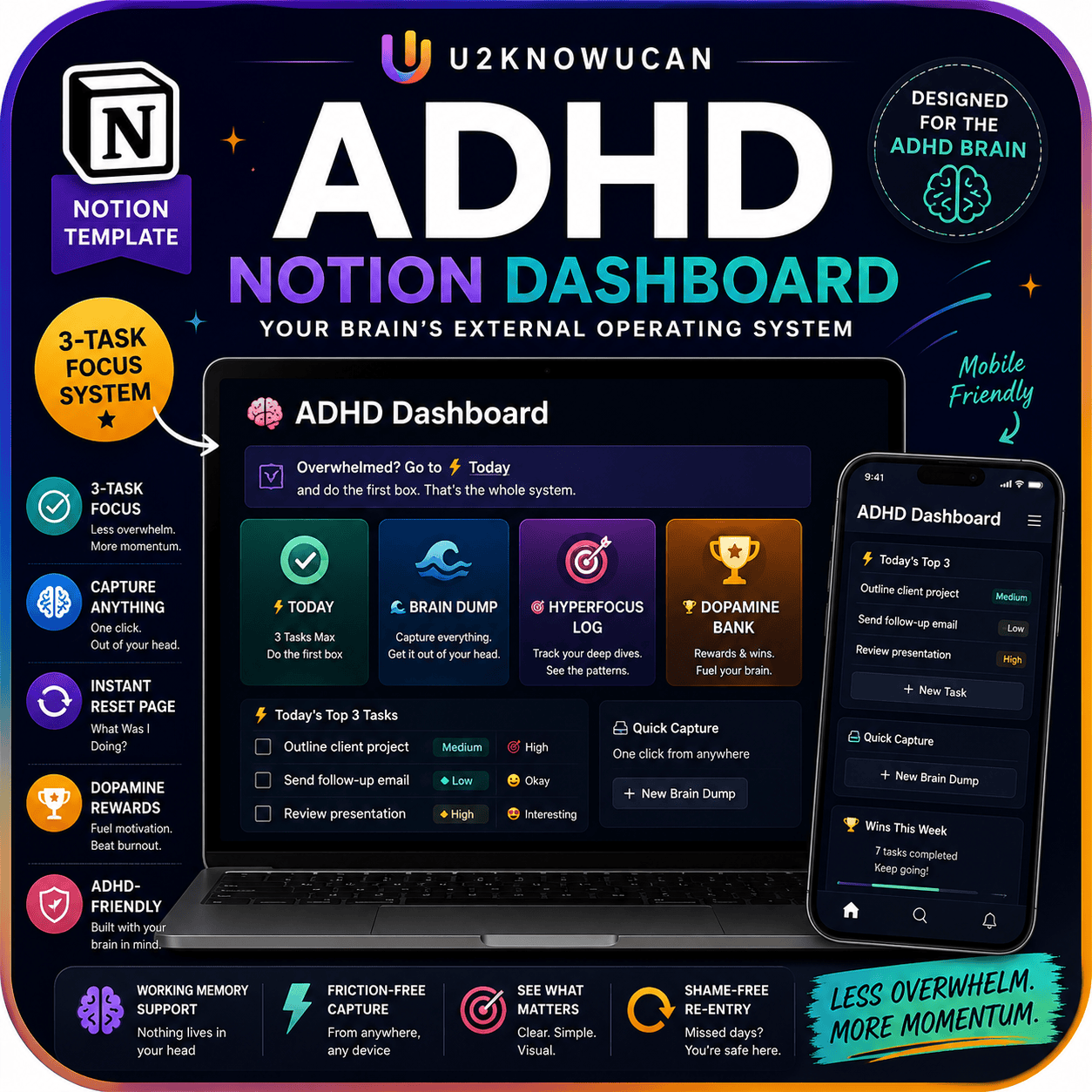
Reclaim Focus with the ADHD Notion Dashboard: A Visual System
$21.99
Brain dump page, visual task board, hyperfocus tracker, and “what was I doing?” reset page. Designed for neurodivergent minds.
Description
Your brain is not the problem. The system was.
Most productivity systems fail ADHD brains. Because they demand daily upkeep. And they punish missed days. So one skipped day turns into a spiral. Then the whole system gets dropped. This one works differently.
Why Most Productivity Systems Fail ADHD Brains
Most planners assume steady habits. So they ask you to check in every day, log every task, and never fall behind. But ADHD attention doesn’t run on a steady schedule. As a result, one off day makes the whole system feel broken. So most people just quit.
The ADHD Notion Dashboard skips that trap. It’s visual-first and low-text, so there’s less to read and less upkeep. And because it’s built around how ADHD actually works, a missed day won’t break it. You just come back in.
What Is the ADHD Notion Dashboard?
This is a Notion template, not a paper planner. So it lives inside your Notion account, and it updates as you click, drag, and type. Because everything is visual, you see your day at a glance instead of reading blocks of text.
Who This Dashboard Is For
This dashboard fits you if daily planners keep failing you. Or if one missed day usually means you give up on the whole system. It also fits you if racing thoughts pile up faster than you can sort them. Or if you hyperfocus hard, then lose the thread of what you were even doing.
What’s Inside
- A brain dump page for racing thoughts
- A visual task board for easy, low-effort planning
- A hyperfocus tracker
- A dopamine reward tracker
- The signature “What Was I Doing?” reset page, for easy re-entry after off days
How to Use It
First, when your thoughts start racing, you dump them onto the brain dump page. So nothing important gets lost, and your head clears fast. Next, you move key tasks onto the visual task board, where light structure replaces long to-do lists.
Then, when you drop into hyperfocus, the tracker logs it. So you can spot your own patterns over time. Meanwhile, the dopamine tracker notes the wins, big or small, and locks them in without judgment.
Finally, after a rough stretch or a few missed days, you open the “What Was I Doing?” page. Because it’s built for this exact moment, it walks you back in gently. So you never have to start over from scratch.
Why This System Works
- ADHD-Friendly by Design — The system is visual-first and low-text, so it won’t punish you for missed days.
- A Visual Task Board — Tasks are laid out to cut mental load, so tracking progress feels easy, not tiring.
- A Brain Dump Page — This gives racing thoughts a landing spot, so your mind clears faster.
- Hyperfocus and Dopamine Tracking — Two trackers follow your focus and your wins, and they reward progress without judgment.
- A Gentle Reset Page — The “What Was I Doing?” page makes re-entry easy after off days. Because the system, not your brain, was always the issue.
Format and Delivery
This is a digital Notion template. So it’s delivered as an instant download link right after checkout. There’s no shipping, and no wait. You’ll need a free or paid Notion account to use it. Once you copy the template into your workspace, it’s yours to edit and make your own.
Getting Started
First, copy the dashboard into your Notion account. Then drop in today’s tasks, and dump your first batch of racing thoughts onto the brain dump page. Because the system flexes around off days, you can start anytime, stop anytime, and pick back up without guilt.
What is the ADHD Notion Dashboard and why is it different from other productivity systems?
The ADHD Notion Dashboard is a visual-first, low-text system built around how ADHD actually works. It won’t punish you for missed days and includes a brain dump page, a visual task board, a hyperfocus tracker, a dopamine reward tracker, and a signature “what was I doing?” reset page.
How does this dashboard accommodate ADHD brains compared to traditional productivity systems?
It is visual-first and low maintenance, designed to reduce cognitive load and avoid daily upkeep, so it doesn’t penalize you for days you miss and supports easier reentry into tasks.
What are the key features of the dashboard and what does each do?
Brain dump page helps capture racing thoughts; a visual task board makes planning easier; a hyperfocus tracker monitors focus patterns; a dopamine reward tracker reinforces productive moments; the “what was I doing?” reset page provides a structured re-entry point.


Reviews
There are no reviews yet.